
In today’s digital landscape, organizations are under increasing pressure to unify their operational backbone with customer-facing systems. Businesses move at the speed of cloud with focus on customer experience. Salesforce shines here with its customer relationship management (CRM) platform by managing leads, opportunities, accounts and customer interactions. SAP, on the other hand, handles the heavy lifting – inventory, finance, and complex logistics. It ensures data integrity and process compliance. SAP and Salesforce are 2 platforms, but when connected effectively, they can transform how businesses operate, sell and serve. Without integration, organizations often face:
- Issues with limited visibility into order and financial data from CRM
- Data silos between sales and operations
- Delays in order processing and customer updates
Integration bridges the gap between the Back office and Front office by aligning business processes. It enables real-time data exchange, improving efficiency and enhancing customer experience.
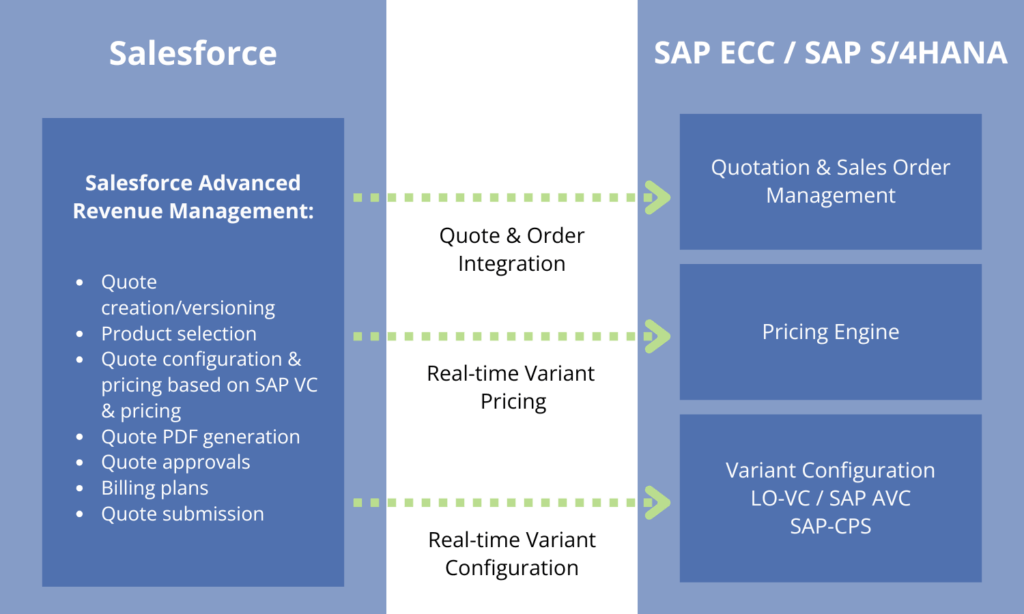
Order-to-Cash Process Integration
Order-to-Cash (O2C) cycle is the entire journey from a customer placing an order to the company receiving payment. It is one of the most common integration scenarios.
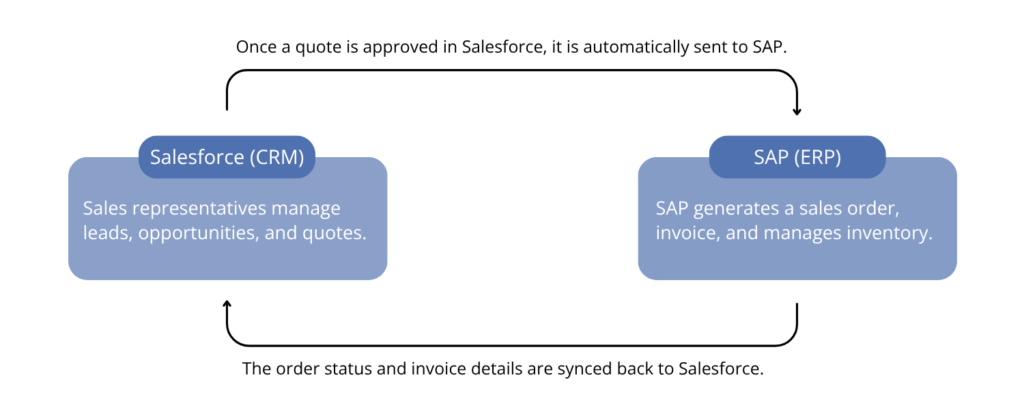
A Sales Order is created (either in Salesforce or SAP). The order is processed in SAP, and status updates flow back to Salesforce. SAP remains the execution engine, while Salesforce acts as the engagement layer.
How SAP and Salesforce Integration Works
Depending on business processes, system landscape, and scalability needs, the integration can be implemented in several ways. The 2 common approaches are:
- Direct API and/or Custom Integration
- Middleware-Based Integration (Third-Party IPaaS Solutions)
Middleware-based solution is used in complicated SAP and Salesforce integrated cases. It acts as a bridge to transform data formats, handle errors and ensure secure communication. Most enterprises use middleware tools such as:
- SAP Integration Suite
- MuleSoft by Salesforce
Data Flow with Middleware-Based Integration (MuleSoft)
A typical integration flow might look like:
- Salesforce sends a sales order request
- Middleware transforms the request into SAP-compatible format
- SAP processes the order and returns confirmation
- Middleware relays confirmation back to Salesforce
- Salesforce updates order status
Key Integration Challenges
SAP and Salesforce integration lets businesses achieve significant results in data integrity and boost productivity, but the procedure does come with challenges.
- Data Mapping and Consistency: The process of data mapping between SAP and Salesforce may take months and requires great attention. This process also ensures data consistency and synchronization between the system.
- Error Handling: Failures in integration flows must be logged, monitored and retired systematically.
- Security and Compliance: SAP and Salesforce integration means making sure that security and compliance protocols meet the requirements of both platforms, which can take time.
- Process Automation: Setting up automation for two comprehensive systems in parallel could lead to process lags. This requires time and the relevant skill set to successfully fix and connect the processes.
SAP-Salesforce Integration Best Practices
The integration of these 2 complex systems needs detailed planning and preparation. Here are some best practices that businesses should follow to achieve efficient system functioning and seamless data flow connectivity.
- Detailed Planning: Plan the migration process and clearly define the system ownership for each data object
- Middleware: Use of Middleware tools like MuleSoft or SAP Integration Suite helps with flexibility, performance and scalability
- Testing: Identifying errors early in the process makes the integration a lot smoother and this can be done with regressive testing. This includes conducting functional, unit, integration, and user acceptance testing (UAT) to validate data accuracy. Also involving the stakeholders at early stages of the testing proves to be a winner!
- Monitoring: Automated alerts that will help track data-synchronization and identify post-integration errors will ensure timely fixes
Final Thoughts
Humans speak different languages and so do systems. SAP and Salesforce are two unique systems (in their own domain), which are completely different, but with successful integration, they become a powerful tool which enables businesses to make better decisions. It aligns front-office agility with back-office precision and creates a seamless flow from customer engagement to operational execution. Understanding the business processes and the integration architecture is crucial. The real value lies not in just connecting the systems, but in fast and efficient execution along with improved customer experience.