
Artificial intelligence (AI) is transforming the SAP world. For those of us who have spent years working in traditional SAP environments, the pace of this change can be challenging to absorb. As AI coding assistants become increasingly common across software development, SAP is bringing similar capabilities into its own development ecosystem.
SAP applies AI across many areas of its portfolio, supporting both business users and business processes. This document focuses on one specific area: AI assistance for ABAP development through Joule for Developers. Rather than functioning as a separate application, Joule is integrated directly into the ABAP development experience.
1. Preparing Your Development Environment
If you have worked primarily in SE80 or the classic SAP GUI editors, the first change is the development environment itself. Joule for Developers is integrated into ABAP Development Tools (ADT), the Eclipse-based development environment used for modern ABAP development, and into ABAP Development Tools for Visual Studio Code. In Visual Studio Code, Joule capabilities are being introduced incrementally, so available functionality depends on the extension version and may differ from that available in ADT for Eclipse. Joule is not available in SE80 or the classic SAP GUI.
To use Joule, three prerequisites must be in place. First, ADT for Eclipse or ABAP Development Tools for Visual Studio Code must be installed on your PC. Second, you need a connection to a system where Joule is supported and enabled, such as SAP Business Technology Platform (SAP BTP) ABAP Environment or SAP S/4HANA Cloud, Public Edition. For SAP S/4HANA Cloud, Private Edition, availability depends on your system release and landscape configuration. Third, the necessary authorizations to use Joule must be assigned.
You do not need to be an expert in newer ABAP syntax, Core Data Services (CDS) views, the ABAP RESTful Application Programming Model (RAP), or released APIs before you start. Knowing them helps you get more out of Joule, but explaining these modern patterns in the context of your existing code is one of the things Joule does best, so it is also a practical way to learn them.
2. SAP Joule vs. General AI Assistants
General-purpose AI assistants handle broad programming concepts well, and many developers use them productively for routine ABAP tasks. However, they lack visibility into your specific system landscape, custom developments, and release levels. While most of their output is usable, they are prone to suggesting credible-looking tables, classes, or APIs that do not actually exist in your target environment, wasting valuable troubleshooting time.
In contrast, SAP Joule runs natively inside the development workspace, with access to the available development context and under your existing authorizations. Joule is built on SAP-specific models, including SAP-ABAP-1, SAP’s foundation model for understanding and explaining ABAP code. Where a general AI assistant may propose obsolete tables, function modules, or direct database reads that do not align with modern development practices, Joule can use SAP documentation and the available development context to recommend released APIs, clean-core patterns, and alternatives that are better aligned with the target environment.
2.1 A Note on the ABAP AI SDK
You will see the ABAP AI SDK (software development kit) mentioned alongside Joule, and it is worth knowing the difference. The SDK is a library that lets you write code to build AI features into your custom applications, like creating an app that automatically summarizes long documents for your users.
The distinction is simple: Joule helps you while you are writing code; the SDK helps you build AI features for other people to use.
3. Core Capabilities in the Editor
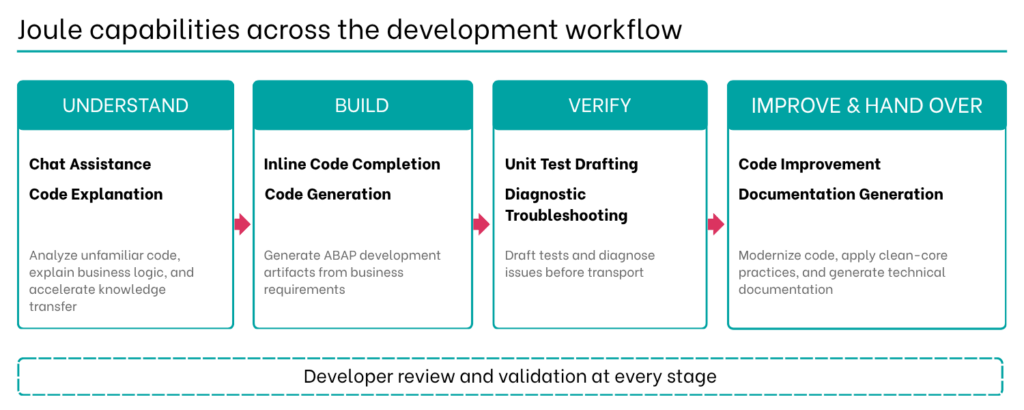
Once Joule is enabled in your workspace, it acts as a context-aware assistant directly within the editor, using the available code and development context to provide real-time support. Available capabilities vary by product version and release, so confirm what is enabled for your system.
3.1 Understand
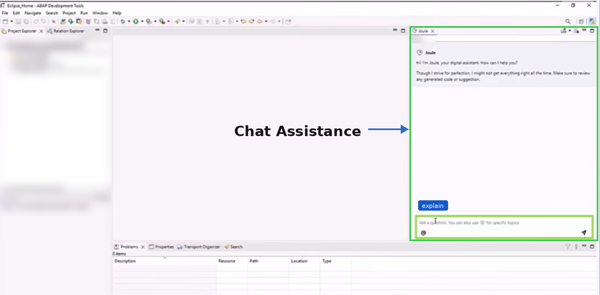
Chat Assistance: A conversational assistant with a dedicated view inside the development environment. You can ask about ABAP syntax, framework concepts, SAP standard functionality, or the object you currently have open. Because Joule reads the active editor context, its answers relate to the code in front of you rather than to generic examples. For S/4HANA conversion questions, the documentation chat also draws on SAP simplification items and cookbooks, so the guidance reflects the changes affecting your own code.
Code Explanation: Joule explains development objects and selected lines of code on request, such as what a class does, how a CDS view is structured, or why a piece of existing logic behaves as it does. It can also evaluate whether standard functionality or released APIs already address a requirement, helping teams identify standard alternatives before writing custom code.
3.2 Build
Inline Code Completion: As you write code, Joule suggests relevant completions directly in the editor as ghost text, accepted with the Tab key. This applies whether you are writing standard ABAP or working with newer technologies such as CDS, RAP, and Entity Manipulation Language (EML).
Code Generation: Developers can describe a requirement in plain language and let Joule generate an initial implementation of an ABAP class, CDS view, or API integration as a starting point to review and refine. With the ABAP Cloud generators (the object-creation wizards in ADT), this extends to a complete RAP business object created from an existing table or a short description, including proposed validations and determinations, the RAP counterparts of the field checks and derived values you would otherwise code by hand.
3.3 Verify
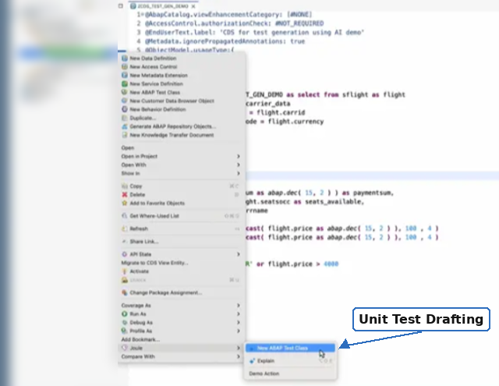
Unit Test Drafting: Joule can write the first draft of an ABAP Unit test for a class or method, including the test class, test methods, and sample test data. When the code under test reads database tables or calls other classes, Joule can also draft test doubles, stand-in objects that return predefined values during execution, allowing tests to run independently of live system data or dependent components. This reduces much of the routine effort involved in setting up unit tests.
Diagnostic Troubleshooting: ST22 helps identify runtime errors and provides details about the conditions under which they occurred. Joule can take the analysis a step further. Provide the error information alongside the relevant code in the development environment, and Joule explains the likely cause and suggests where to investigate. The same works for syntax errors and ABAP Test Cockpit (ATC) findings, SAP’s built-in checks for performance, code quality, and S/4HANA readiness, where Joule can also propose an initial correction for developer review.
3.4 Improve and Hand Over
Code Improvement: Joule can suggest cleaner ABAP alternatives and cloud-ready refactoring patterns for selected code. It drafts newer syntax, restructures repetitive constructs, and explains each recommendation, leaving the developer to confirm that the revised code behaves as before. Joule can also assist with addressing multiple S/4HANA readiness findings across development objects, with the developer reviewing and validating the proposed changes.
Documentation Generation: Joule drafts ABAP Doc comments, structured comments embedded directly in ABAP source code that ABAP Development Tools displays as formatted hover text and built-in documentation. Unlike classic editors such as SE80 or SE24, which do not render this format, ABAP Doc is an ADT-native feature that keeps documentation close to the code itself. Beyond ABAP Doc, Joule can also generate class and method descriptions, as well as summaries of code changes, helping teams keep technical documentation current alongside the codebase.
4. Real-World Development Examples
4.1 Decoding a Legacy Program
The Problem: A developer inherits an undocumented custom report that is more than a decade old, with no design specifications and no available subject matter experts from the original development team. Understanding the processing logic, identifying object dependencies, and exploring the likely intent behind the implementation can require significant investigation before any changes can be made.
The AI Action: Rather than tracing dozens of obsolete forms, function modules, and database reads by hand, you ask Joule: “Explain the purpose of this program, identify its main processing steps, summarize the tables and development objects it uses, and highlight areas that require technical or functional review.”
The Outcome: A structured overview detailing the program’s primary logic paths, object dependencies, and key technical areas requiring review. Even when massive programs require a section-by-section analysis, this method significantly accelerates code comprehension and serves as an architectural blueprint before code changes are made.
4.2 Modernizing a Database Query
The Problem: Modernizing legacy data access for S/4HANA is not always a direct table-to-view replacement. Moving from a classic accounting table such as BSEG to a universal journal view such as I_JournalEntryItem changes the granularity of the data, and the right released CDS view, field mapping, filters, and aggregation depend on the business purpose of the original program and on your target system’s data model.
The AI Action: You highlight the classic statement and ask Joule: “I need to modernize this BSEG query for an S/4HANA migration. The program evaluates general ledger balances. Propose an optimized, clean-core compliant query using a released CDS view and explain the relevant selection filters and performance considerations for the new data structure.”
The Outcome: Joule drafts a candidate query using a released CDS view and newer ABAP SQL syntax. It also surfaces the dimensions that must be considered when moving to the new data model (ledger, fiscal year, company code, currency), which a simple table-name replacement would not address:
SELECT Ledger,
       CompanyCode,
       AccountingDocument,
       FiscalYear,
       CompanyCodeCurrency,
       AmountInCompanyCodeCurrency
  FROM I_JournalEntryItem
  INTO TABLE @DATA(lt_journal)
  WHERE CompanyCode        = @company_code
    AND AccountingDocument = @accounting_doc
    AND FiscalYear         = @fiscal_year
    " example ledger restriction; validate for the scenario
    AND Ledger             = '0L'.
5. Getting Better Prompts
The quality of the output depends heavily on how the request is framed. One practical structure is C.A.S.E., which stands for context, action, specifics, and expectation:
- Context: The background (refactoring an older sales order report).
- Action: The actual request (suggest an optimized SELECT statement).
- Specifics: The tables, APIs, or structures involved (VBAK and VBAP).
- Expectation: Constraints on the output, such as newer ABAP SQL syntax, the selection criteria you need, and any performance considerations.
Vague: “How do I query sales orders?” This gives too little to work with, and the answer may well be an outdated pattern.
Better: “I am refactoring an older sales order report. Suggest an efficient SELECT statement using VBAK and VBAP with current ABAP SQL syntax. Filter by sales organization (VKORG), distribution channel (VTWEG), and document date (AUDAT). Avoid unnecessary columns and explain any performance considerations or assumptions.” The second version provides enough detail for a specific response, which typically reduces the number of correction cycles.
Final Thoughts
AI is a development partner, not an autonomous replacement. By generating initial code, system analyses, and technical documentation, tools like SAP Joule give developers a starting point to work from. However, because AI output depends on the system context and prompt constraints you provide, developer oversight remains essential. Minor typos or incomplete definitions can quickly lead to flawed logic, incorrect assumptions, or recommendations that do not align with the reality of your SAP landscape. Developers must stay firmly in the driver’s seat to safeguard structural integrity and solution quality.
Ultimately, this technology does not reduce the importance of development work; it expands what a single developer can achieve. By automating repetitive groundwork, AI frees developers to focus on high-level architecture, business requirements, and strategic execution. Utilized effectively, Joule becomes a powerful collaborative asset that enables teams to work faster, understand more, and approach modernization with greater confidence.